AI software pipeline
A system that takes a written software issue from ticket to merged code. AI coding agents do the work, and no human approves the merge.
- Built for
- My own software projects, including DSGA Tools and the pipeline itself.
- Status
- In use since July 2026.
- Figures
- Measured October 2, 2026, from 1,943 recorded agent runs on the two computers that ran it.
- My role
- The design ideas listed below, decisions about behavior and scope, and handling stalled issues. Claude Code wrote all the code.
- Built with
- Python. Each agent is a Claude Code session. GitHub issues and labels hold each issue’s state.
- Timeline
- First commit June 29, 2026. First recorded run July 3, 2026.
- Size
- About 23,100 lines of Python, about 33,500 lines of tests, and 1,702 commits.
The problem
I was doing every step of each change by hand, in one Claude Code session after another.
I would start a session to implement a plan or a fix. If the app needed a smoke test, I ran it myself. (A smoke test is a quick run through the app to check that its main features still work.) Then I ran a code review on the pull request, usually several times, until the major problems were gone.
I wanted those steps to run without me, including while I slept.
What I built
The system has three parts, built in this order.
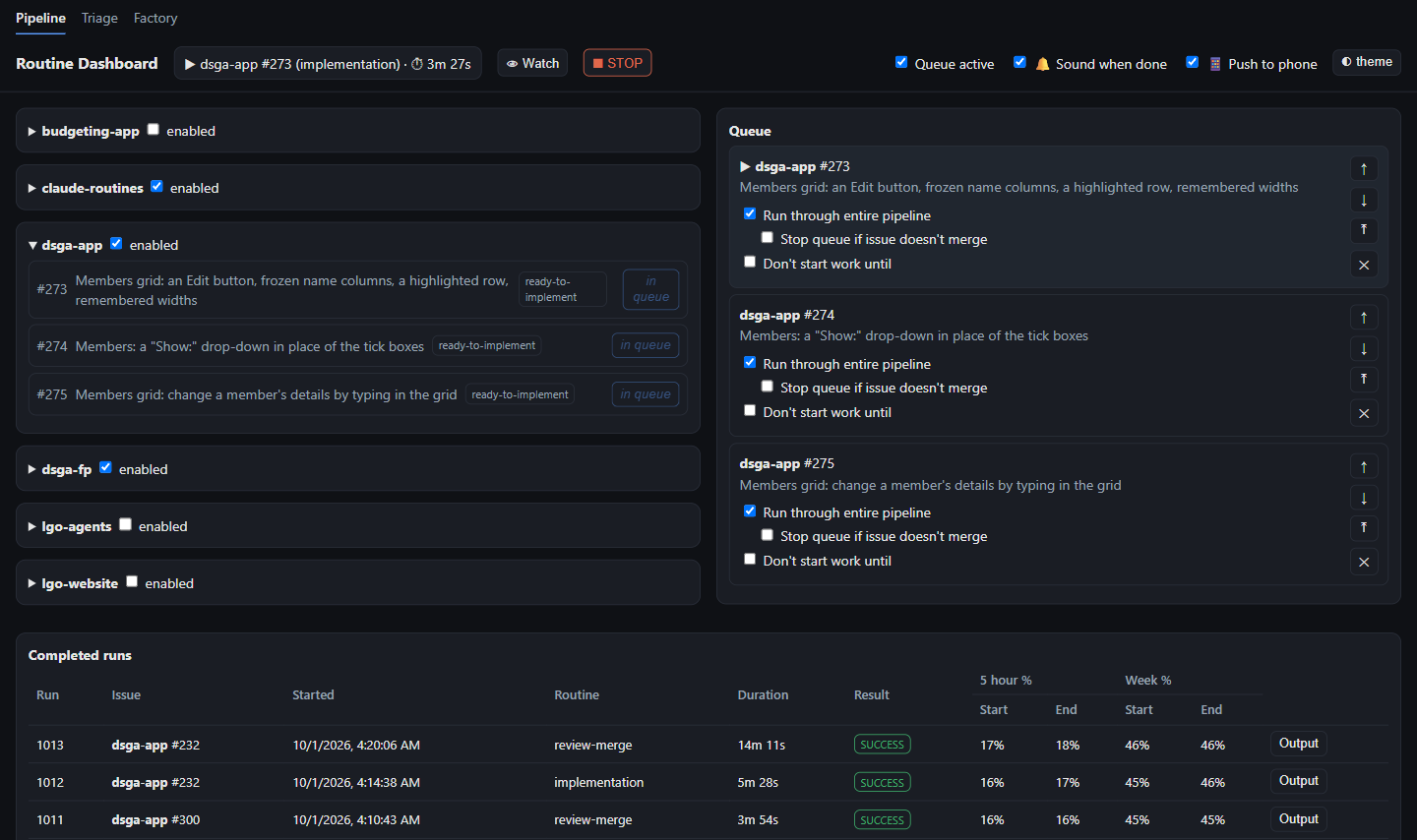
- The issue pipeline takes one issue through implementation, a smoke test (when applicable), and then review and merge.
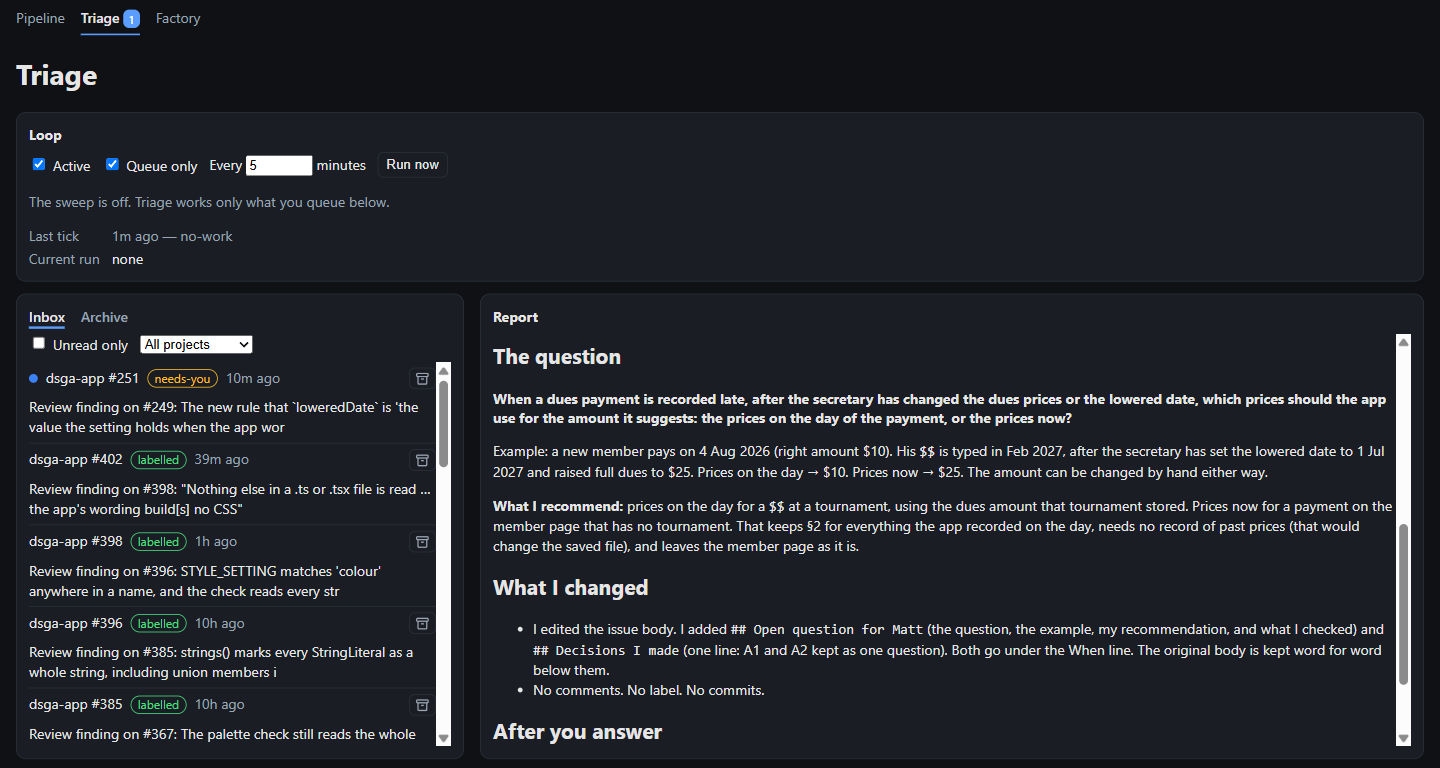
- Triage checks whether an issue is ready to be run through the pipeline. If it is, it adds the appropriate label. Before triage, I prepared each issue by hand.
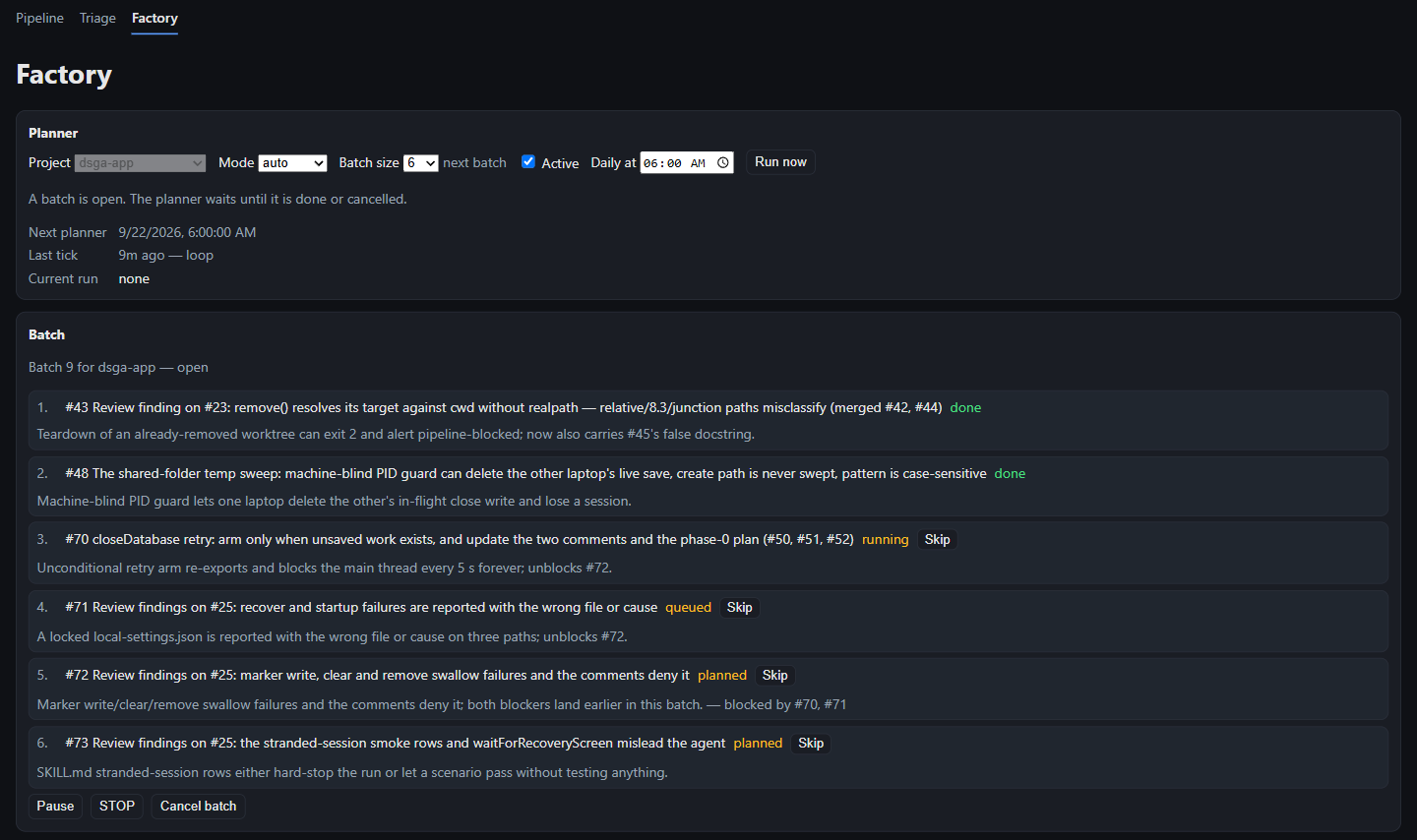
- The factory picks the most important open issues in a project and puts them in order. It then sends them through triage and the pipeline.
A dashboard runs all three. I can open it from my phone or tablet, and it notifies my phone when it needs me.
How it works
A label is a tag on a GitHub issue. It shows which stage the issue has reached. Labels on each issue hold the state, and every stage is a fresh agent session that works one issue and exits.
| Label on the issue | Stage | What happens |
|---|---|---|
ready-to-implement | Implementation | An agent writes the change on its own branch and opens a pull request. When the change needs a smoke test, the agent also writes the scenarios for it. It never merges. |
needs-smoke-testing | Smoke test | An agent runs the app through those scenarios. A failure sends the issue back to implementation, at most twice. |
needs-code-review | Review and merge | A program runs the review sessions below. They find problems and fix the ones that must be fixed before the merge. Then the program merges. |
Review and merge is a program that runs several agent sessions in order.
- A finder looks for problems in the code.
- A second finder checks documents and instructions, when those changed.
- A judge sorts each finding: fix before merge, file as a follow-up issue, or decline.
- A fixer fixes what must be fixed, for up to three rounds.
- A merge gate brings in the latest main branch and runs the project’s checks. It merges only if they pass.
Any stage can stop and mark the issue needs-human-review. I call this a park. A parked issue waits until the problem is cleared.
The dashboard allows only one pipeline run at a time on each computer. It refuses to start a run when my subscription is near its usage limit.
Triage looks at one issue per run. It can label the issue ready, send me a question, mark the issue as work for a person, or report that the problem is already gone.
The factory leaves the choice of issues to the model. It orders issues by importance first, then by dependency. No human approves its picks. When one of its issues parks, a repair run (a separate agent session) tries to clear it, and the factory gives up after four parks.
A supervising session. I often run a separate Claude Code session with one of my “watch” skills (written instructions for one kind of task). I call this a watch session. It follows the queue, clears the parks it can diagnose, and asks me only when it is stuck.
One issue through the pipeline
Checks that the issue is ready for the pipeline and adds the label.
Writes the change on its own branch and opens a pull request.
Runs the app through written scenarios. A failure sends the issue back to implementation.
Finders, a judge, and a fixer. The merge gate runs the checks.
The checks passed. The change is placed in the main branch.
My role and the AI’s
Claude Code wrote all the code.
Four of the design ideas were mine:
- Labels on the issue hold the state.
- Each stage is a fresh session.
- The triage step.
- The factory.
Other important choices were Claude’s proposals, which I approved. They include merging on the checks’ real exit codes (instead of on the agent’s opinion), and splitting the review step into finder, judge, and fixer.
I make every decision about how an app, agent, or dashboard should behave. For technical choices during a park, I ask Claude’s advice and usually take it.
Why it merges without me
I do not read code, so a human review step before the merge would add nothing.
For projects that only I use, a merged pull request is good enough. I find problems by using the software, and I file each one as a new issue. For a project someone else uses, such as DSGA Tools, I test it myself before I ship it.
Results
From July 3 to October 2, 2026, the pipeline took 533 issues from ticket to merged code across five projects.
| Measure | Figure |
|---|---|
| Issues taken end to end | 533 |
| Issues that parked at least once | 91 of 533, or 17% |
| Median compute cost per issue, since mid-August | $11.45 at API list price |
| Share of that cost spent in review | 70% |
| Median agent time per issue, since mid-August | 39.5 minutes over 3 runs |
| Median time from first run to merge, since mid-August | 0.86 hours |
- By project. The pipeline’s own code had 208 issues, a budgeting app prototype (development paused) had 205, a golf league scoring app (still in development) had 89, DSGA Tools had 26, and the Let’s Geek Out agents had 5.
- Parks vary by project. Since mid-August the park rate ran from about 9% to about 24%, depending on the project.
- Parked issues cost about twice as much. The median was $19.32, against $10.43 for issues that never parked.
- Writing the code is the cheap part. A median implementation run cost $2.01. A median review run cost $5.54.
- Waiting is most of the elapsed time. From the ready label to the merge, the median was 2.93 hours.
- Triage. In 177 runs it labeled 127 issues ready with no human, sent me 23 questions, and marked 17 issues as work for an interactive session. A median run cost $1.15.
- Factory. It ran 11 batches covering 62 issues, and 60 of them merged.
- Share of my work. Since mid-August, 81% of merged pull requests on these projects closed an issue the pipeline handled.
What went wrong
-
Code reviews never finished. Some pull requests took 7 to 9 rounds of review, and every round found something new. Two things caused this. An AI reviewer checks only a sample of the code, so a “clean” round never arrives. And the session that wrote the code also decided which findings counted.
How it was solved: In September 2026 a Python program took over the review stage. One or two separate reviewers look for problems. A third session, the “judge”, sorts each finding against one written standard: fix it now, file it as a new issue, or decline it. Review stops after three rounds at most. The first three real pull requests through the new stage merged in one, two, and three rounds.
-
The same rules drifted apart across projects. Each project had its own copy of every AI prompt. A fix made in one copy did not reach the others.
How it was solved: The prompts are now built from shared templates. A test fails if any built prompt does not match its source.
-
Real runs broke in ways that rehearsals could not show. The first live reviews stopped on problems that only the outside world causes. For example, the program tried to merge before GitHub had finished checking the pull request. It also hit a Windows limit on command length, and that crash came after the paid review had already run. Each failure used up one full review round.
How it was solved: The program now waits for GitHub to finish, and it sends long text through a file. Test fakes are now copied from real GitHub answers, not from guesses about them.
-
A known bug was merged anyway. A reviewer found a real bug, but the run stopped before the bug was fixed. The next review was a new sample, and it did not find the bug again. So the code merged with the bug still in it.
How it was solved: Unfixed findings now stay open across stops and restarts. A pull request cannot merge while one is still open.
Safety
The agents run with permission checks switched off and with no sandbox. A sandbox would limit the files and programs an agent can reach.
An agent can do anything my Windows login can do. It also holds a GitHub token with write access. Three things contain it: the one-at-a-time queue, the usage limits, and the merge gate.
That is acceptable for private projects on my own computers, with no customer data. It would need a different security model before it went near an employer’s code.
Skills around the pipeline
I wrote several Claude Code skills that the pipeline uses or that supervise it.
- prepare-issue turns an issue into a complete, self-contained task. Triage runs it.
- watch-issue follows the queue, works out why a run parked, and recovers it. The factory’s repair run uses its instructions.
- prose-only-review reviews instruction documents against a fixed list of affected places, so the review can finish. It is the second finder in the review stage.
- salvage-review-round rebuilds a review that crashed at its last step. On one issue the salvage cost $2.18. A full rerun would have repeated $6.63 of work.
Status
The pipeline is in use and ready for the next issue from several projects.